08 · Security, admin & governance
Threat model, controls, telemetry, data handling, and the honest gaps. If your executive audience includes anyone from risk, legal, security or compliance, this is the section they will actually read.
The shared threat model: prompt injection
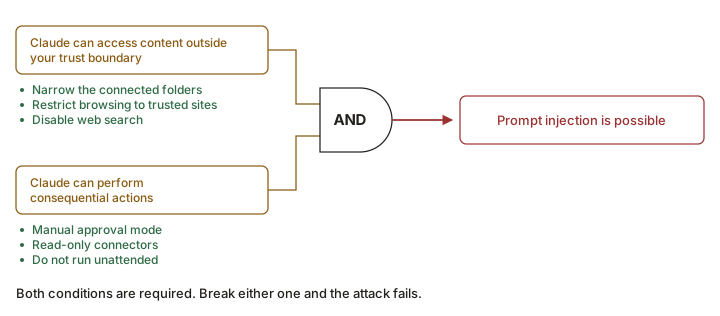
Both products name prompt injection as the principal risk. Anthropic's Cowork guidance gives the cleanest formulation, and it is the best teaching device in the whole documentation set:
The two-condition ruleA prompt-injection attack requires two conditions simultaneously:
- Claude can access content outside your trust boundary, and
- Claude can perform consequential actions.
Break either one and the attack fails.
That framing gives non-technical leaders an actionable lever: they don't need to understand tokenisation to understand "don't let it read the internet and send email in the same unattended run."
Built-in protections, side by side
| Protection | Cowork | Claude Code |
|---|---|---|
| Model training to recognise malicious instructions | ✓ Reinforcement learning | ✓ Context-aware analysis of the full request |
| Content classifiers scanning for injections | ✓ | ◐ Not described in these terms; auto-mode safety checks play this role |
| Action screening in automatic mode | ✓ In "Automatically approve" mode | ✓ Auto mode background safety checks |
| Explicit permission before deletion | ✓ | ✓ |
| Per-application permission for computer use | ✓ Plus a default blocklist and a user custom blocklist | ✓ |
| Isolated context for web fetches | ◐ Not documented | ✓ "Web fetch uses a separate context window to avoid injecting potentially malicious prompts" |
| Network commands not auto-approved | — | ✓ curl, wget prompt by default |
| Command-injection detection | — | ✓ Suspicious bash requires approval even if allowlisted |
| Fail-closed matching | — | ✓ Unmatched commands default to manual approval |
| Trust verification for new codebases / MCP servers | ◐ Plugin/connector auth flows | ✓ First-run trust prompts (disabled with -p) |
| Deterministic blocking (hooks) | ◐ Only via a plugin | ✓ PreToolUse hooks; permissions.deny; auto-mode hard deny |
| Secure credential storage | Account-based | ✓ macOS Keychain; file permissions on Windows/Linux |
| WebFetch domain safety check | — | ✓ Hostname (only) checked against an Anthropic blocklist; 5-min cache |
User responsibilities Anthropic explicitly assigns
For Cowork the documentation is unusually direct about what remains the user's job:
- File access — avoid granting Claude access to sensitive information such as financial documents.
- Browser permissions — limit internet access to trusted sites.
- Monitoring — "watch for unexpected patterns rather than validating every command."
- Scheduled tasks — exercise caution with unattended automation, especially involving sensitive data or consequential actions.
- Match oversight to stakes — use "Manually approve" mode for sensitive operations.
For Claude Code: "Claude Code only has the permissions you grant it. You're responsible for reviewing proposed code and commands for safety before approval." Plus: review before approving, don't pipe untrusted content directly to Claude, verify changes to critical files, use VMs for scripts that touch external services, and report suspicious behaviour with /feedback.
Cowork — "While we've enacted these safety measures to reduce risks, the chances of an attack are still non-zero."
support.claude.com — Use Claude Cowork safely
Claude Code — "While these protections significantly reduce risk, no system is completely immune to all attacks. Always maintain good security practices when working with any AI tool."
code.claude.com/docs/en/security
Computer use — labelled a research preview in both products. Anthropic recommends avoiding it with healthcare, financial, legal, or others' personal information, and warns that the trust boundary differs from the sandboxed Bash tool because "computer use runs on your actual desktop with access to the apps you approve."
code.claude.com/docs/en/computer-use · support.claude.com article 14128542
Administrative controls
Cowork
| Control | Detail |
|---|---|
| Org-wide enable/disable | Cowork is on by default; organization owners can disable it. Organization settings → Cowork. |
| Cloud sessions | Team: enabled by default, owner can disable. Enterprise: disabled by default — owner must explicitly enable and grant the capability via custom roles. |
| Connector tool approvals | "Allow 'Always allow' for connector tools" — off by default. When off, the "Allow for all tasks" option is greyed out even where org policy would otherwise permit it. |
| Plugin governance | Curated marketplaces with four tiers: Installed by Default, Available, Required, Not Available. Enterprise admins can vary this per group. |
| Network egress | Cowork respects existing egress permissions. Carve-out: these restrictions do not apply to web fetch, web search, or MCPs. Web search can be disabled separately under Capabilities. |
| Custom roles & groups | Enterprise: selectively enable Cowork or cloud-session access for specific teams. |
| Monitoring | OpenTelemetry export, Team and Enterprise. See below. |
Claude Code
- Managed settings (
managed-settings.json) — technical enforcement:permissions.deny,sandbox.enabled,env,forceLoginMethod,forceLoginOrgUUID. Deployed by MDM, Group Policy, Ansible. - Blocking the permissive modes —
permissions.disableBypassPermissionsMode: "disable"removesbypassPermissions(the--dangerously-skip-permissionsmode, which "offers no protection against prompt injection or unintended actions"), andpermissions.disableAutoMode: "disable"removes auto mode from theShift+Tabcycle and rejects--permission-mode autoat startup. Both belong in any managed rollout; see §07. - Managed CLAUDE.md — behavioural guidance at a system path, or inline via the
claudeMdkey. Cannot be excluded by users. - Server-managed settings — central configuration without device-management infrastructure (Team/Enterprise).
- Managed MCP — allowlists and denylists restricting which MCP servers users can add or connect to.
- Claude apps gateway — self-hosted, SSO sign-in, per-group model access, OTLP telemetry, and per-developer spend limits enforced live per request.
- Corporate launcher — force every Claude Code process through a required wrapper.
- ConfigChange hooks — audit or block settings changes during a session.
- Required plugin version ranges for managed deployments.
"Settings rules are enforced by the client regardless of what Claude decides to do. CLAUDE.md instructions shape Claude's behavior but are not a hard enforcement layer."
Configure in managed settings: blocking tools/commands/paths, sandbox enforcement, env vars and provider routing, auth method and org lock.
Configure in managed CLAUDE.md: code style, data-handling reminders, behavioural instructions.
Monitoring & telemetry
Cowork — OpenTelemetry (Team & Enterprise)
Configured at Admin settings → Cowork with an OTLP endpoint, protocol (http/json or http/protobuf) and headers. Requires desktop app v1.1.4173+. Settings load at session start, so existing sessions won't pick up changes.
Six event types are exported:
| Event | Fires when | Notable attributes |
|---|---|---|
user_prompt | User submits a prompt | prompt_length, prompt (content-gated) |
assistant_response | Model completes a text response | model, request_id, response (truncated to 60 KB; <REDACTED> when disabled). Requires v1.17377+ |
tool_result | A tool finishes | tool_name, success, duration_ms, decision_type, decision_source, tool_input |
api_request | Each API call | cost_usd, input_tokens, output_tokens, cache tokens, speed |
api_error | An API call fails | status_code, attempt, error |
tool_decision | A permission decision is made | decision (accept/reject), source (config, hook, user_permanent, user_temporary, user_abort, user_reject) |
Standard attributes on every event: session.id, organization.id, user.account_uuid, user.account_id, user.id, user.email, workspace.host_paths, terminal.type (always non-interactive for Cowork). Resource attributes: service.name = cowork, service.version, host.arch, os.type, os.version.
Correlation: a prompt.id (UUID v4) links every event produced while processing a single user prompt. On third-party deployments, otlpTracesEnabled (beta) adds trace_id / span_id.
- Events include metadata only by default. Prompt content, response text and tool details require explicitly enabling
otlpContentCapture(userPrompts,assistantResponses,toolDetails). - Enabling user-prompt capture also turns on model-response capture.
user.emailis always included — Anthropic advises configuring your backend to filter or redact it if that's a concern.cost_usdvalues are approximations; use the billing dashboard for official numbers.
Claude Code — OTel plus a first-party analytics product
- OpenTelemetry metrics — available on every provider.
- Analytics dashboard — Team and Enterprise. Enterprise Analytics API for programmatic access. Contribution metrics require a claude.ai Team or Enterprise org.
- Cost controls — token tracking, team spend limits,
/usagebreakdown showing which skills, subagents and MCP servers drive limits. - Cloud session audit logging — "All operations in cloud sessions are logged for compliance and audit purposes."
Data handling & retention
Model training
| Account type | Policy |
|---|---|
| Consumer (Free, Pro, Max) | You choose. Anthropic will train new models using data from these accounts when the setting is on — including Claude Code usage from those accounts. |
| Commercial (Team, Enterprise, API, 3P platforms, Claude Gov) | Anthropic does not train generative models on code or prompts under commercial terms — unless the customer has opted in (e.g. the Development Partner Program, which an org admin must expressly enable, and which is first-party API only). |
Retention
| Scenario | Retention |
|---|---|
| Consumer, data-use-for-improvement ON | 5 years |
| Consumer, data-use-for-improvement OFF | 30 days |
| Commercial (Team, Enterprise, API) standard | 30 days |
| Zero Data Retention | Qualified accounts on Claude for Enterprise; not included in the standard Enterprise plan; enabled per-organisation by your account team |
| Claude Code local transcripts | Plaintext under ~/.claude/projects/, 30 days by default (cleanupPeriodDays) |
Transcripts shared via /feedback, /bug, /share | 5 years |
| Transcripts shared via the session-quality survey | Up to 6 months; cannot be used to train models |
| Cowork local session data | Not subject to Anthropic's standard data retention policies; cannot be centrally managed by admins |
| Cowork cloud sessions | Saved to the user's account; captured in the Compliance API |
Encryption at rest, by provider (Claude Code)
| Provider | At rest |
|---|---|
| Anthropic API | Infrastructure-level disk encryption (AES-256); ZDR available for no server-side persistence |
| Amazon Bedrock | AES-256 with AWS-managed keys; CMK via AWS KMS |
| Google Cloud's Agent Platform | Google-managed keys; CMEK available |
| Microsoft Foundry | Azure-hosted: prompts and completions stay in Azure, only usage metadata and safety-flagged content egress. Anthropic-hosted: AES-256 disk encryption |
In transit, everywhere: TLS 1.2+.
Telemetry defaults and opt-outs (Claude Code)
- Metrics — latency, reliability, usage patterns. Never include code, prompts or file paths.
DISABLE_TELEMETRY=1. - Error reports — on only for Pro/Max sign-ins on v2.1.198+ connecting directly to the Claude API, and not for ZDR/HIPAA orgs.
DISABLE_ERROR_REPORTING=1. - Everything non-essential at once —
CLAUDE_CODE_DISABLE_NONESSENTIAL_TRAFFIC. - On Bedrock, Google Cloud's Agent Platform, Microsoft Foundry and Claude Platform on AWS, error reporting, telemetry and bug reporting are off by default.
- Two exceptions that run regardless of provider: session-quality surveys and the WebFetch domain safety check.
Certifications
Anthropic points to the Trust Center for SOC 2 Type 2, ISO 27001 and other compliance artefacts. A "Claude Cowork Security Overview" document is listed there for third-party platforms. Security vulnerabilities are reported through Anthropic's HackerOne programme.
Honest gap analysis
| Gap | Impact | Mitigation available today |
|---|---|---|
| Cowork activity in audit logs / the Compliance API — two Anthropic sources disagree | High for regulated industries. The product page states flatly that "Cowork activity is not yet captured in audit logs or Compliance API"; the Team/Enterprise help article states that "Cowork via mobile and web is captured in the Compliance API." Both were live on the compile date. The pack reads this as local-vs-cloud, but that reconciliation is ours, not Anthropic's — see §16. Quote both sentences to a General Counsel rather than picking one. | Enable OTel monitoring (Team/Ent.) and treat your collector as the audit trail. Enable cloud sessions, which are captured. |
| No deterministic deny rules in Cowork | Medium–high. Guardrails are probabilistic, not enforced. | Manual permission mode for sensitive work; restrict connected folders; restrict connectors; keep "Always allow" for connector tools off; disable web search where appropriate. |
| Cowork projects are not shareable | Medium. Team-level standardisation is manual. | Package shared context as a plugin (skills + connectors), and distribute via a required org marketplace entry. |
| Egress controls don't cover web fetch, web search, MCP | Medium. The obvious exfiltration paths are the ones egress rules don't cover. | Disable web search under Capabilities; govern MCP via the curated marketplace; restrict connector write permissions. |
| No Zero Data Retention story documented for Cowork | Medium for ZDR-committed customers. | Confirm with your Anthropic account team before promising it. |
| Computer use is a research preview with named risks | Medium. Screenshots may capture sensitive on-screen data. | Use the default and custom application blocklists; avoid sensitive apps entirely; Pro/Max only anyway. |
Frame the gaps as sequencing, not defects: Claude Code has had a longer runway with a more forgiving audience, so its governance surface is further along. Cowork's is visibly being built out release by release. Then give the concrete recommendation: pilot Cowork on non-regulated workflows first, instrument it with OTel from day one, and revisit the compliance question each quarter.