07 · Autonomy, permissions & delegation
How much rope you give the agent, how you take it back, and the four different ways to hand work off and walk away. This is the module executives engage with most — it's where "AI tool" becomes "delegation model."
Permission modes side by side
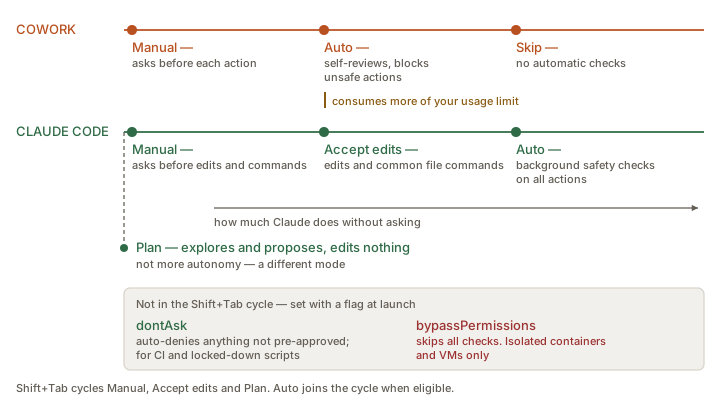
Shift+Tab cycle entirely; bypassPermissions is the one a security lead will ask about.Cowork — three modes
- Manual — Claude asks before each action.
- Auto — Claude self-reviews for safety; only blocks unsafe actions.
- Skip — no automatic checks.
Documented cost note: "Auto mode consumes more of your usage limit than the other modes" because of the extra safety checks.
Claude Code — six modes
In the Shift+Tab cycle:
- Manual (
default) — reads only; asks before file edits and shell commands. - Accept edits — edits files and runs common filesystem commands (
mkdir,touch,rm,rmdir,mv,cp,sed) without asking; other commands still prompt. - Plan — explores and proposes a plan without editing source files.
- Auto — everything, with background safety checks from a separate classifier model. Joins the cycle when your account is eligible.
Flag-only, never in the default cycle:
dontAsk— auto-denies every call that would otherwise prompt; only pre-approved tools run. "For CI pipelines or restricted environments… the session never waits for input."bypassPermissions— "disables permission prompts and safety checks so tool calls execute immediately." Set with--permission-mode bypassPermissionsor the equivalent--dangerously-skip-permissions.
Anthropic's warnings on bypassPermissions are unusually blunt, and you should quote them rather than paraphrase:
"Only use this mode in isolated environments like containers, VMs, or dev containers without internet access, where Claude Code cannot damage your host system."
"
bypassPermissionsoffers no protection against prompt injection or unintended actions."
Guardrails that remain: you cannot enter it from a running session; the first interactive use shows a responsibility dialog; it refuses to start as root or under sudo on Linux and macOS; rm -rf / and rm -rf ~ still prompt as a circuit breaker; explicit ask rules still fire; and Claude Code on the web ignores it from settings files, so a repository cannot start a cloud session in bypass mode.
Administrators block it with permissions.disableBypassPermissionsMode: "disable" in managed settings — and block auto mode with permissions.disableAutoMode: "disable". Both belong in any managed rollout; see §08.
Protected paths
A documented detail worth knowing, because it is the one place the modes stop behaving monotonically. Writes to a fixed set of paths — .git, .claude, .vscode, shell rc files, .npmrc, .mcp.json and others — are never auto-approved, and permissions.allow rules in settings do not pre-approve them.
| Mode | Protected-path writes |
|---|---|
default, acceptEdits | Prompted |
plan | Prompted (routed to the classifier when auto mode is available during planning) |
auto | Routed to the classifier |
dontAsk | Denied |
bypassPermissions | Allowed |
code.claude.com/docs/en/permission-modes
The structural difference
Claude Code's permission system is declarative and layered on top of the modes:
permissions.allow/ask/denyrules, matching tools and parameters, in.claude/settings.json.- Settings layers from organisation-wide managed policy down to personal preference, with documented precedence.
- A built-in set of read-only commands (
ls,cat,git status) that never prompt. - Fail-closed matching — unmatched commands default to requiring manual approval.
- Command-injection detection — suspicious bash requires manual approval even if previously allowlisted.
- Network commands (
curl,wget) are not auto-approved by default. PreToolUsehooks as hard, deterministic blocking — enforcement rather than instruction.- Auto mode hard deny rules to block actions unconditionally.
Cowork's permission system is modal plus a handful of admin toggles. The documented granular controls are: the three modes, per-application approval for computer use (with a default blocklist covering investment platforms and cryptocurrency tools, plus a user-definable custom blocklist), explicit permission required before file deletion, and the org-level "Allow 'Always allow' for connector tools" setting (off by default).
Both products make Claude ask. Only Claude Code lets you make it unable. If a stakeholder asks "can we guarantee it never touches X?", the honest answer for Cowork today is "you can restrict scope and reduce likelihood; you cannot write a deterministic block."
Safety mechanisms that are not permissions
| Mechanism | Cowork | Claude Code |
|---|---|---|
| Undo file changes | ✗ Not documented | ✓ Checkpoints: files snapshotted before edits; Esc Esc to rewind; separate from git; survives session resume |
| Restore conversation state | ✗ | ✓ /rewind — resume from before a /clear |
| Interrupt mid-action | ✓ Real-time visibility into actions, file access and tool usage | ✓ Esc cancels the running tool; typing a correction steers without stopping it |
| Isolation between parallel work | ◐ Sessions are separate | ✓ Git worktrees; agent view auto-isolates each dispatched session |
| Delete protection | ✓ "Explicit permission requirements before file deletion" | ✓ Destructive commands prompt; deny rules available |
"Actions that affect remote systems (databases, APIs, deployments) can't be checkpointed, which is why Claude asks before running commands with external side effects." Use this to teach the general principle: reversibility is the real permission boundary. Local file edits are cheap to undo; an email sent or a record updated is not.
The four ways to delegate and walk away
1 · Remote / background sessions
Cowork
Unattended operation is the default posture: work "continues running after user closes laptop," because it runs on Anthropic's servers. Sessions are visible and resumable from desktop, web and mobile. Local-resource access pauses when the desktop app closes.
Claude Code
Cloud sessions on claude.ai/code keep running after you disconnect. claude --cloud pushes a local session up; claude --teleport pulls a cloud session down. Agent view (claude agents, research preview) manages many background sessions from one screen.
2 · Dispatch — the cross-product router
Dispatch is worth a slide of its own because it is the clearest architectural statement Anthropic has made about how these two products relate.
Verbatim — Dispatch guide"Dispatch is a long-running agent in Cowork that takes high-level instructions and carries them out in the background. You describe an outcome in a single conversation; the Dispatch agent breaks it into tasks, runs each one as a separate Cowork or Code session, and surfaces the results in the sidebar when they finish."
| Task type | Runs in | Examples |
|---|---|---|
| Coding work | Code, against a workspace you've already set up | Fix a bug, open a pull request, run tests |
| Knowledge work | Cowork, in the project you specify (or your default) | Research, write a document, organize files |
Mechanics worth knowing:
- Requires Pro or Max and the latest Claude Desktop on macOS or Windows. Not on Team or Enterprise.
- One conversation with the Dispatch agent; many child tasks beneath it. Child tasks don't spawn further children.
- Task states: Running · Awaiting input · Awaiting answer · Completed · Error · Archived.
- Permission prompts from child tasks are forwarded to you. If you don't respond within ten minutes, the request is automatically denied and the task continues without that action.
- You can brief Dispatch from the Claude mobile app while Claude Desktop runs on your awake, online computer — your machine registers as a Dispatch host.
Fail-closed-then-continue is an interesting design choice: unanswered permission requests are denied, but the task does not stop. Executives should understand that an unattended Dispatch task can therefore complete partially — with the risky step skipped. Check the transcript, don't assume completeness.
3 · Scheduled and recurring work
| Cowork scheduled tasks | Claude Code Routines | Claude Code Desktop scheduled tasks | Claude Code /loop | |
|---|---|---|---|---|
| Runs on | Anthropic cloud | Anthropic-managed infrastructure | Your machine | Inside the current CLI session |
| Machine must be on | ✗ No | ✗ No | ✓ Yes | ✓ Yes |
| Cadence options | Hourly, daily, weekly, weekdays, manual | Cron schedule; also API-call and GitHub-event triggers | Recurring | Interval, or self-paced |
| Local folder access | ✗ "Can't be tied to a folder on your computer" | ✗ Cloud | ✓ Direct local file and tool access | ✓ |
| Uses connectors / skills / plugins | ✓ Each task is its own Cowork session | ✓ | ✓ | ✓ |
| Plan requirement | All paid plans (beta) | Claude subscription (Pro/Max/Team/Ent.) | Claude subscription | All providers (with caveats on 3P) |
Cowork scheduled-task setup offers two routes: guided ("start from the Scheduled tasks page and let Claude guide you with multiple-choice prompts") or manual (name, prompt, approval mode, frequency, optional model, work folder). From the sidebar you can view upcoming and past runs, edit, pause/resume, delete, or run on demand.
Documented use cases: daily briefings from messages or calendar, weekly reports from spreadsheets or connected tools, recurring research tracking, file organisation and cleanup, team status updates from project-management tools.
Cowork scheduled tasks buy you "runs while you sleep" by giving up "reads my local folders." If the recurring job needs local files, you need the Desktop-based path instead. This is exactly the kind of concrete constraint that makes a training session credible.
4 · Event-driven work — Claude Code only
- Routines can trigger on API calls or GitHub events.
- Channels push messages, alerts and webhooks into a running session from an MCP server — CI results, chat messages, monitoring events — so Claude reacts while you're away. (Pro/Max; admin-enabled on Team/Enterprise; unavailable on third-party providers.)
- GitHub Actions / GitLab CI/CD run Claude in the pipeline.
- Code Review reviews every PR automatically (Team/Enterprise).
Cowork has no documented event-trigger mechanism. Its automation vocabulary is schedule-based and human-briefed.
Steering an agentic session — guidance that transfers
Claude Code's "work effectively" section is the best-written user guidance in either product's docs, and almost all of it applies to Cowork. Teach these five:
| Principle | What it means |
|---|---|
| It's a conversation | "You don't need perfect prompts. Start with what you want, then refine." When the first attempt is wrong, you iterate — you don't start over. |
| Interrupt and steer | Esc stops immediately. Or type a correction and press Enter — Claude reads it as soon as the current action completes and adjusts. |
| Be specific upfront | Reference specific files, state constraints, point at example patterns. "Vague prompts work, but you'll spend more time steering." |
| Give it something to verify against | Test cases, screenshots, a defined output shape. "Claude performs better when it can check its own work." The single highest-leverage habit to teach executives. |
| Explore before implementing | Separate research from execution. Plan mode first, review the plan, then execute. "This two-phase approach produces better results than jumping straight to code." |
"Give it something to verify against" becomes: tell it what 'done and correct' looks like. A reference deck it should match. A number the totals must reconcile to. A checklist the output must satisfy. Agents that can self-check produce dramatically better first drafts — and this is the one habit that separates people who get value from Cowork from people who don't.