04 · Surfaces & availability
Every place each product runs, what you gain or lose on each, and the system requirements. This is the page you will be asked about most often in Q&A.
Where each product runs
| Surface | Cowork | Claude Code |
|---|---|---|
| Terminal / CLI | ✗ — the point of Cowork is "without opening the terminal" | ✓ The most complete surface |
| Claude Desktop app (macOS, Windows) | ✓ Full experience | ✓ The "Code" tab |
| Claude Desktop on Linux | ◐ Desktop app is in beta on Linux (Ubuntu/Debian) | ◐ Same |
| Web (claude.ai) | ◐ Beta; rollout began with Max | ✓ claude.ai/code — cloud sessions |
| Mobile (iOS, Android) | ◐ Beta | ✓ Start/monitor cloud sessions; Remote Control; Dispatch |
| VS Code / Cursor | ✗ | ✓ Extension: inline diffs, @-mentions, plan review, history |
| JetBrains (IntelliJ, PyCharm, WebStorm…) | ✗ | ✓ Plugin (requires the CLI installed separately) |
| GitHub Actions / GitLab CI/CD | ✗ | ✓ |
| Slack | ◐ Slack connector included on Team; not a Cowork surface | ✓ @Claude in a channel returns PRs |
| Chrome | ✓ Claude in Chrome pairs with Cowork | ✓ Test web apps, debug with console logs, automate forms |
| Programmatic / SDK | ✗ | ✓ Claude Agent SDK (Python + TypeScript), headless mode |
Cowork by surface
Anthropic publishes an explicit desktop/web/mobile matrix. Reproduced faithfully:
| Feature | Desktop | Web | Mobile |
|---|---|---|---|
| Start / steer tasks | ✓ | ✓ | ✓ |
| Resume across devices | ✓ | ✓ | ✓ |
| Scheduled tasks | ✓ | ✓ | ✓ |
| Local file access | ✓ | ◐ via Desktop* | ◐ via Desktop* |
| Browser use | ✓ | ◐ via Desktop* | ◐ via Desktop* |
| Computer use | ✓ | ◐ via Desktop* | ◐ via Desktop* |
support.claude.com — Use Claude Cowork on web, desktop, and mobile
* Web and mobile reach these through the Desktop app while it is running on your computer.
The Claude Desktop app must be open (and the machine awake) for: reading/writing files in connected folders, browser use via Claude in Chrome, computer use, and local connectors/plugins with MCP servers. Close it and remote sessions keep running but lose access to local resources.
Claude Code by surface
Anthropic's own platform-selection table, reproduced:
| Platform | Best for | What you get |
|---|---|---|
| CLI | Terminal workflows, scripting, remote servers | Full feature set, Agent SDK, computer use on macOS (Pro/Max), third-party providers |
| Desktop | Visual review, parallel sessions, managed setup | Diff viewer, app preview, computer use and Dispatch on Pro/Max |
| VS Code | Staying in the editor | Inline diffs, integrated terminal, file context |
| JetBrains | IntelliJ / PyCharm / WebStorm users | Diff viewer, selection sharing, terminal session |
| Web | Long-running tasks, work that continues offline | Anthropic-managed cloud; continues after you disconnect |
| Mobile | Starting/monitoring away from your computer | Cloud sessions, Remote Control for local sessions, Dispatch to Desktop (Pro/Max) |
code.claude.com/docs/en/platforms
Key structural facts:
- "Each surface connects to the same underlying Claude Code engine, so your CLAUDE.md files, settings, and MCP servers work across all of them."
- "Scripting and the Agent SDK are CLI-only."
- Sessions move between surfaces:
claude --cloud,claude --teleport,/desktop, Remote Control. Teleport and/desktoprequire a claude.ai subscription.
Working away from your desk — the five mechanisms
Claude Code documents five distinct answers to "work while I'm away," which is more nuance than most people expect. Cowork's answer is simpler: remote sessions + Dispatch + scheduled tasks.
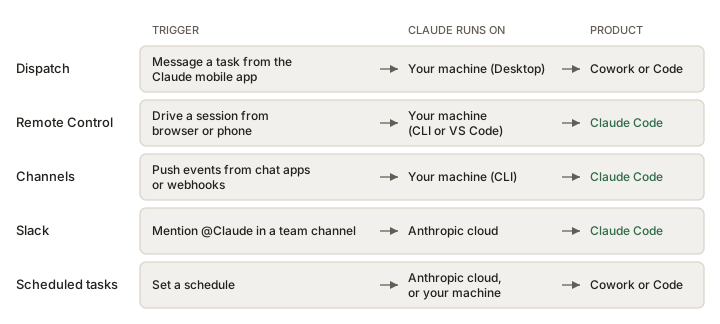
Two Anthropic sources appear to conflict with Fig 3.2, and the pack cannot resolve it from published material:
- Platforms, Dispatch row: "Claude runs on: Your machine (Desktop)."
- Dispatch guide: "When Claude Desktop is running, your computer registers as a Dispatch host… The work runs on your desktop."
- Cowork safety guidance: Cowork work runs "in an isolated environment on Anthropic's servers, separate from your computer and your network."
Our inference — not documented: your machine is the Dispatch host and the bridge to local files, while a Cowork child task still executes in the Cowork environment. That reconciles the three statements, but Anthropic nowhere says it. Do not assert it as fact in a room. Present the conflict, say which reading you favour and why, and flag it as unresolved. Logged in §16.
| Mechanism | Trigger | Claude runs on | Product |
|---|---|---|---|
| Dispatch | Message a task from the Claude mobile app | Your machine (Desktop) | Both — routes to Code or Cowork |
| Remote Control | Drive a running session from claude.ai/code or mobile | Your machine (CLI or VS Code) | Claude Code |
| Channels | Push events from Telegram, Discord, iMessage, webhooks | Your machine (CLI) | Claude Code |
| Slack | @Claude in a team channel | Anthropic cloud | Claude Code |
| Scheduled tasks / Routines | A schedule | CLI, Desktop, or Anthropic cloud | Both |
| Cowork remote sessions | You start a task and close the laptop | Anthropic servers | Cowork |
System requirements
Cowork
- Paid subscription: Pro, Max, Team or Enterprise
- Active internet connection throughout sessions
- Claude Desktop app (macOS or Windows) open, for local file access and browser use
- Available on Desktop, web (claude.ai) and mobile (latest iOS/Android)
- OTel monitoring requires Claude desktop app v1.1.4173+; model-response events require v1.17377+
- Dispatch requires Pro or Max and the latest desktop app on macOS or Windows
Claude Code
- Install:
curl -fsSL https://claude.ai/install.sh | bash(macOS/Linux/WSL),irm https://claude.ai/install.ps1 | iex(Windows PowerShell), plus Homebrew, WinGet, apt/dnf/apk - Native installs auto-update; Homebrew and WinGet do not
- Git for Windows recommended on native Windows so the Bash tool works; otherwise PowerShell is used
- Auth: claude.ai login,
ANTHROPIC_API_KEY, or a third-party provider - Desktop app: macOS (Intel + Apple Silicon), Windows x64 and ARM64, Linux beta
- WSL 2 supported on Windows; dev containers supported
How to enable Cowork
- Open Claude on any supported surface
- In the message box, select Cowork
- Describe the task
- Review Claude's approach and let it execute
support.claude.com — Get started with Claude Cowork
Model providers — a Claude Code-only dimension
This is a major enterprise differentiator with no Cowork equivalent. Claude Code can be pointed at:
- Claude subscription (claude.ai Pro/Max/Team/Enterprise)
- Anthropic Console (API key)
- Amazon Bedrock (
CLAUDE_CODE_USE_BEDROCK) - Claude Platform on AWS — bought through AWS Marketplace, calling the Anthropic API (
CLAUDE_CODE_USE_ANTHROPIC_AWS) - Google Cloud's Agent Platform, formerly Vertex AI (
CLAUDE_CODE_USE_VERTEX) - Microsoft Foundry (
CLAUDE_CODE_USE_FOUNDRY) - A self-hosted LLM gateway, including Anthropic's own "Claude apps gateway" with SSO, per-group model access, OTLP telemetry and per-developer spend limits
The CLI and everything local works everywhere. What requires a claude.ai subscription and is therefore unavailable on Bedrock/Vertex/Foundry/Console: Claude Code on the web, mobile, Slack, Desktop (except via Claude Desktop on 3P or managed settings), Routines, Ultraplan, Ultrareview, Code Review, Remote Control, the Chrome extension, computer use, Artifacts, and voice dictation. Fast mode, Advisor and Channels also drop off on all four third-party providers.
Provider-specific gaps worth knowing
| Feature | Claude sub. | Console | Bedrock | Claude Platform on AWS | Google Agent Platform | MS Foundry |
|---|---|---|---|---|---|---|
| Web search | ✓ | ✓ | ✗ | ✓ | ◐ Claude 4+ | ◐ Anthropic-hosted only |
| Fast mode | ✓ | ✓ | ✗ | ✗ | ✗ | ✗ |
| Auto mode | ✓ | ✓ | ◐ | ✓ | ◐ | ◐ |
| Advisor | ✓ | ✓ | ✗ | ✗ | ✗ | ✗ |
| Channels | ✓ | ✓ | ✗ | ✗ | ✗ | ✗ |
| GitHub Actions / GitLab CI | ✓ | ✓ | ✓ | ✓ | ✓ | ✗ |
| Analytics dashboard & API | ◐ Dashboard: Team/Ent. · API: Ent. only | ◐ | ✗ | ✗ | ✗ | ✗ |
| Server-managed settings | ◐ Team/Ent. | ◐ Team/Ent. | ✗ | ✗ | ✗ | ✗ |
code.claude.com/docs/en/feature-availability — ◐ on auto mode means Sonnet 5 / Opus 4.7+ / Fable 5 only.
Features documented as available on every provider: CLI, Agent SDK, VS Code and JetBrains extensions, subagents, hooks, commands, skills, CLAUDE.md memory, plugins, MCP servers, checkpoints, sandboxing, workflows, OpenTelemetry metrics, and the managed settings file.