03 · Architecture & execution model
The agentic loop they share, and the execution environments they don't. This is the section that determines every security, compliance and "why does it need my laptop open" answer later in the curriculum.
The shared agentic loop
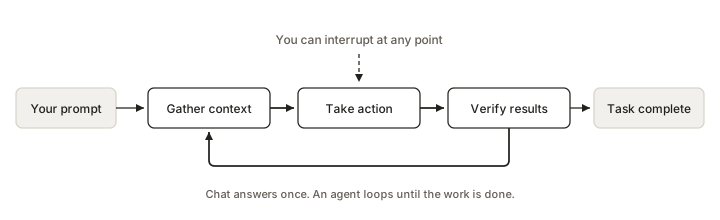
Claude Code's documentation gives the canonical description, and it applies to both products:
Verbatim — How Claude Code works"When you give Claude a task, it works through three phases: gather context, take action, and verify results. These phases blend together. Claude uses tools throughout, whether searching files to understand your code, editing to make changes, or running tests to check its work."
"Claude Code serves as the agentic harness around Claude: it provides the tools, context management, and execution environment that turn a language model into a capable coding agent."
Two components power the loop: models that reason, and tools that act. Without tools the model can only produce text; with tools it can read, edit, execute, search and call external services. Each tool result feeds back and informs the next decision. The user is part of the loop and can interrupt at any point.
The five tool categories (Claude Code, documented)
| Category | What Claude can do |
|---|---|
| File operations | Read files, edit code, create new files, rename and reorganize |
| Search | Find files by pattern, search content with regex, explore codebases |
| Execution | Run shell commands, start servers, run tests, use git |
| Web | Search the web, fetch documentation, look up error messages |
| Code intelligence | Type errors after edits, jump to definitions, find references (requires a code intelligence plugin) |
Plus orchestration tools: spawning subagents, asking the user questions, and so on. Cowork exercises the same shape of toolset but oriented at documents, spreadsheets, presentations, connectors and the browser rather than at a codebase; Anthropic has not published an equivalent per-tool reference for Cowork.
Claude Code has a full public Tools reference page enumerating every tool and its permission behaviour. Cowork does not. Do not present a "Cowork tool list" as though it were documented — describe capabilities instead.
Execution environment — the decisive difference
Cowork
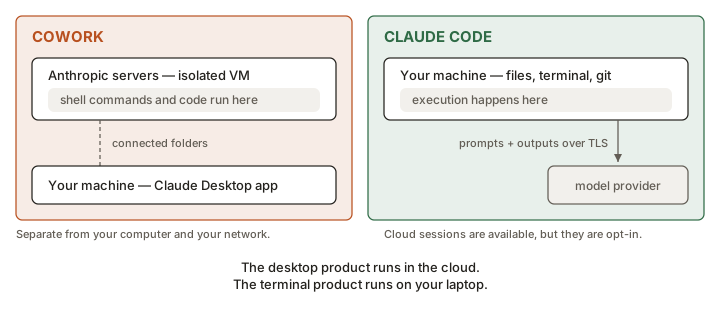
Runs remotely, on Anthropic infrastructure.
"The work Claude does there, including any local files it opens through the desktop app, is processed on Anthropic's servers rather than staying on your computer." Work runs "in an isolated environment on Anthropic's servers, separate from your computer and your network," and "shell commands and code run inside that environment."
The admin monitoring documentation refers to this directly as "the Cowork VM" and notes the OTel exporter "runs inside the Cowork VM, so it is subject to the session's egress rules."
Claude Code
Runs locally by default; cloud is opt-in.
Three documented environments:
- Local — your machine. "Default. Full access to your files, tools, and environment."
- Cloud — Anthropic-managed VMs. "Offload tasks, work on repos you don't have locally."
- Remote Control — code runs on your machine, driven from a browser. "All code execution and file access stays local."
What this means practically
| Question | Cowork | Claude Code (local) |
|---|---|---|
| Does my content leave my machine? | Yes — files opened through the desktop app are processed on Anthropic's servers | Prompts and model outputs go over TLS to the model provider; execution and files stay local |
| Does it need my machine on? | Only for local file access, browser use, computer use, and local MCP servers. Otherwise no. | Yes for local sessions. No for cloud sessions or Routines. |
| Can it use my internal network? | No — the environment is "separate from your computer and your network"; egress follows your network-egress settings | Yes — it runs inside your network with your credentials |
| Where is the isolation boundary? | Between Anthropic's VM and your machine | Between the sandboxed Bash tool / dev container and the rest of your machine (opt-in) |
The desktop product runs in the cloud. The terminal product runs on your laptop. Executives reliably guess the opposite. Make them guess out loud first — it's the most memorable moment in the module.
Sandboxing and isolation
Cowork
Isolation is architectural and not user-configurable: the session simply runs in Anthropic's isolated environment. What is configurable at the org level is network egress — Cowork "respects your current settings," and an admin restricting egress will have their OTel collector hostname auto-added to the allowlist. Note the documented carve-out: egress restrictions "don't apply to web fetch, web search, or MCPs," though owners can disable web search separately under Capabilities.
Claude Code
Isolation is a spectrum you choose, documented across several pages:
- Working directory boundary (always on) — Claude Code "can only write to the folder where it was started and its subfolders, and cannot modify files in parent directories without explicit permission."
- Sandboxed Bash tool — filesystem and network isolation for shell commands, enabled with
/sandbox, withdenyReadrules available. - Dev containers, Docker, VMs — for stronger isolation.
- Cloud sessions — isolated Anthropic-managed VM, network access limited by default and configurable, git push restricted to the current branch, credentials handled through a secure proxy, all operations audit-logged, VMs reclaimed after inactivity.
Sessions, context and memory
Claude Code
- Conversation saved locally as plaintext JSONL under
~/.claude/projects/, retained 30 days by default (cleanupPeriodDays). - Sessions are independent — each starts with a fresh context window.
- Continuity comes from CLAUDE.md (you write it) and auto memory (Claude writes it). The first 200 lines or 25 KB of
MEMORY.mdload at session start. - Sessions can be resumed (
--continue,--resume), forked (--fork-session,/branch), named, exported, and are tied to the working directory — so git worktrees enable true parallel sessions. - Checkpoints: files are snapshotted before edits;
Esc Escrewinds. Independent of git. Does not cover remote side effects. - Context is auto-compacted: older tool outputs cleared first, then the conversation summarised. Project-root CLAUDE.md is re-read and re-injected after
/compact.
Cowork
- Continuity comes from the Project: folders, standing instructions, links, linked claude.ai projects, and a project-scoped memory store that persists across sessions.
- Sessions are visible and resumable across desktop, web and mobile — "the same sessions and files are available on desktop, web, and mobile."
- Documented gap: "memory from chat doesn't carry to Cowork sessions (except within projects)," and there is no session sharing across users.
- Local session data "is not subject to Anthropic's standard data retention policies" and cannot be centrally managed by admins; cloud sessions save to the user's account and are captured in the Compliance API.
| Continuity mechanism | Cowork | Claude Code |
|---|---|---|
| User-authored standing instructions | Project Instructions field | CLAUDE.md, CLAUDE.local.md, .claude/rules/ |
| Agent-authored memory | Project memory store | Auto memory (MEMORY.md + topic files) |
| Org-wide instructions | Via required plugins / admin settings | Managed policy CLAUDE.md + claudeMd in managed settings |
| Version controlled | ✗ | ✓ committed with the repo |
| Undo / rewind | Not documented as a checkpoint system | ✓ checkpoints, Esc Esc, /rewind |
Sub-agents and parallelism
Cowork
Documented as "sub-agent coordination": "Complex work gets divided into smaller tasks with parallel workstreams for faster results." Dispatch adds a second layer — one conversation with a Dispatch agent that spawns many child tasks, each of which runs as its own Cowork or Code session. Child tasks "don't spawn further children of their own."
Claude Code
Four distinct, separately documented mechanisms — worth showing as a table because the depth here is a real differentiator:
| Approach | What it gives you | Status |
|---|---|---|
| Subagents | Delegated workers inside one session with their own context, returning a summary | No maturity label published |
| Agent view | One screen to dispatch and monitor background sessions (claude agents); each gets its own worktree automatically | Research preview |
| Agent teams | Multiple coordinated sessions with a shared task list and inter-agent messaging, managed by a lead | Experimental, disabled by default |
| Dynamic workflows | A script that runs many subagents and cross-checks their results — codebase audits, 500-file migrations, cross-checked research | No maturity label published |
Supporting tools: worktrees (separate git checkout per session so parallel work never collides) and /batch (a skill that splits one large change into 5–30 worktree-isolated subagents, each opening a pull request).
Do not go deep on agent teams or dynamic workflows with an executive audience — it's engineering-internal detail. Use it only as evidence for one point: Claude Code's orchestration surface is several years more mature than Cowork's, because it has had longer and a more tolerant audience.
Model access
Claude Code exposes explicit model configuration (/model, claude --model, aliases like opusplan), a documented fast mode for faster Opus responses, and an Advisor feature that pairs the main model with a stronger advisor model consulted at key moments. Cowork lets you choose a model when configuring a scheduled task; its per-session model controls are not documented to the same depth.