06 · Configuration & extensibility
How you teach each product about your organisation. Cowork's Projects vs Claude Code's CLAUDE.md and .claude/ — plus the shared skills / plugins / MCP layer, and the one gotcha that catches every developer.
The gotcha, first
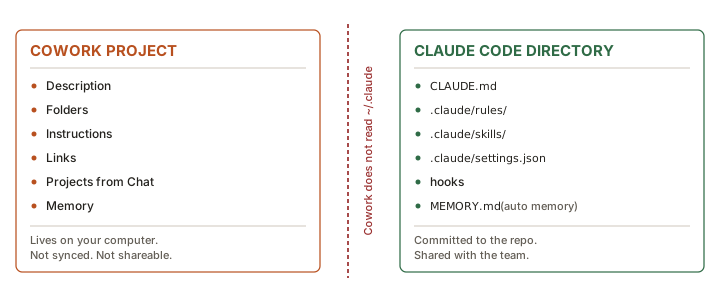
Verbatim — Cowork overview"Cowork loads the connectors, skills, and plugins enabled for your claude.ai account, synced at session start, and doesn't read the Claude Code CLI's
~/.claudedirectory on your machine. To use a skill or plugin that exists only in~/.claude, add it in Customize."
Consequences to state explicitly in class:
- Cowork configuration is account-scoped and cloud-synced; Claude Code configuration is machine- and repo-scoped.
- A skill written for one does not automatically appear in the other. Sharing means publishing it as a plugin (or re-adding it via Customize).
- Cowork picks up changes at session start — editing a skill mid-session won't take effect until you start a new one. The same is true of Claude Code's CLAUDE.md within a session.
Cowork: the Project as the configuration unit
A Cowork project "collects everything Claude needs for a recurring area of work." Contents, verbatim from the docs:
| Item | Purpose |
|---|---|
| Description | What the project is for; Dispatch reads it when choosing a project for a task |
| Folders | One or more local folders Claude can read and write inside this project's sessions |
| Instructions | Standing guidance applied to every session in the project |
| Links | Reference URLs (documents, dashboards, repositories) Claude can consult |
| Projects from Chat | claude.ai projects whose knowledge this Cowork project can draw on |
| Memory | A project-scoped memory store that persists across sessions |
Creating one
Three starting points: Start from scratch (empty project, new folder), Import a project (bring in an existing claude.ai project), or Use an existing folder.
Cowork project vs claude.ai project — a distinction people conflate
| Cowork project | claude.ai project | |
|---|---|---|
| Lives | On your computer only | In your Claude account |
| Holds local folders | ✓ Yes | ✗ No |
| Shareable with teammates | ✗ No | ✓ Yes, on Team and Enterprise |
You can link a claude.ai project into a Cowork project so sessions draw on its knowledge. "Linking doesn't merge them; the claude.ai project stays where it is."
Other documented behaviours
- Files Claude creates land in the project's folders; what Claude learns is saved to project memory.
- Dragging files in copies them into the project's first folder; dragging folders in mounts them as additional project folders.
- Claude reads individual files up to 50 MB.
- Archiving removes the project and deletes its metadata (name, instructions, links, memory) but "does not touch the local folders you attached; your files stay exactly where they are on disk."
- Dispatch can route background tasks into a project so long-running work inherits the same folders, instructions and memory.
Claude Code: CLAUDE.md and the .claude/ directory
Where CLAUDE.md lives, in load order
| Scope | Location | Shared with |
|---|---|---|
| Managed policy | macOS /Library/Application Support/ClaudeCode/CLAUDE.mdLinux/WSL /etc/claude-code/CLAUDE.mdWindows C:\Program Files\ClaudeCode\CLAUDE.md | All users in the organisation |
| User | ~/.claude/CLAUDE.md | Just you, all projects |
| Project | ./CLAUDE.md or ./.claude/CLAUDE.md | Team, via source control |
| Local | ./CLAUDE.local.md (gitignore it) | Just you, this project |
How they load
- Claude Code walks up the directory tree from the working directory, loading every
CLAUDE.mdandCLAUDE.local.mdit finds. - All discovered files are concatenated, not overridden. Root-down ordering, so instructions closest to where you launched are read last. Within a directory,
CLAUDE.local.mdcomes afterCLAUDE.md. - Files in subdirectories load on demand, when Claude reads files there.
@path/to/fileimports are expanded at launch, up to four hops deep. External imports (resolving outside the working directory) trigger a one-time approval dialog.- Managed-policy CLAUDE.md cannot be excluded. Everything else can, via
claudeMdExcludesglobs.
The size discipline Anthropic prescribes
"Target under 200 lines per CLAUDE.md file. Longer files consume more context and reduce adherence." Move reference content into skills or path-scoped rules. Note that @path imports help organisation but do not reduce context, because imported files load at launch anyway.
Rules — path-scoped instructions
.claude/rules/*.md files load every session, unless they carry paths: frontmatter, in which case they load only when Claude touches matching files:
---
paths:
  - "src/api/**/*.ts"
---

# API Development Rules
- All API endpoints must include input validation
- Use the standard error response format
Rules support glob patterns, brace expansion (budget: 1,000 expanded patterns / 4 MiB per rule), symlinks for sharing across projects, and a user-level variant at ~/.claude/rules/.
Auto memory
- On by default. Toggle in
/memory, orautoMemoryEnabled: false, orCLAUDE_CODE_DISABLE_AUTO_MEMORY=1. - Stored per repository at
~/.claude/projects/<project>/memory/— shared across worktrees, machine-local, never synced across machines. MEMORY.mdis a concise index; only its first 200 lines or 25 KB load at session start. Topic files load on demand.- Plain markdown — auditable, editable, deletable.
AGENTS.md interoperability
Claude Code reads CLAUDE.md, not AGENTS.md. If a repo already has one, create a CLAUDE.md that imports it:
@AGENTS.md

## Claude Code
Use plan mode for changes under `src/billing/`.
/init also reads Cursor rules, Copilot instructions, and (with CLAUDE_CODE_NEW_INIT=1) AGENTS.md, Devin, Windsurf and Cline rules.
The shared extension layer
Skills
Markdown files containing knowledge, workflows or instructions. Invocable as /name, or loaded automatically by the model when relevant. Both products support them.
- Cowork Managed through Customize in the sidebar; account-scoped.
- Claude Code Discovered from managed / user / project / plugin scopes with documented precedence (managed > user > project). Can run in isolated context (
context: fork), be hidden from the model (disable-model-invocation: true), or be preloaded into a subagent.
Plugins — the interoperability layer
Verbatim — Cowork plugins guide"Plugins are available in Cowork and Code. They aren't used in Chat."
A plugin manifest can declare any combination of:
| Component | What it adds |
|---|---|
| Skills | Reusable instructions that teach Claude a workflow |
| Connectors | MCP servers that give Claude access to an external service |
| Agents | Specialised subagents Claude can delegate to |
| Hooks | Scripts that run at defined points in a session |
Plugins are the only documented mechanism for a single packaged capability to work in both products. If an organisation wants "our way of doing X" to hold for both engineers and knowledge workers, a plugin is the answer — not a Cowork project and not a CLAUDE.md.
Distribution
- Anthropic's official catalogue is the default marketplace; you can add others by URL.
- A git repository can serve as a marketplace — GitHub (including Enterprise) supported; public GitLab and Bitbucket repos also work. Accepts
https://github.com/owner/repoor theowner/reposhorthand. - Install from a file by uploading the package.
- On Team and Enterprise, admins can mark plugins Required — they install automatically, show "This plugin is required by your organization," and cannot be removed by the user.
- Cowork detects locally edited plugin files and warns before an update would overwrite them.
Documented limits (both products)
| Limit | Value |
|---|---|
| Plugin package size (uncompressed) | 200 MB |
| Files per plugin package | 5,000 |
| Marketplace repository archive | 512 MB |
| Plugins per marketplace | 500 |
| Marketplaces you can add | 25 |
| In-app skill viewer preview | 1 MB per file (larger files still available to Claude at runtime) |
MCP / connectors
Model Context Protocol is the open standard connecting Claude to external systems — Google Drive, Jira, Slack, Linear, Notion, databases, internal APIs. Both products consume it.
- Cowork Connectors managed under Customize; loaded from the claude.ai account at session start. Local MCP servers require the desktop app open. Admin setting: "Allow 'Always allow' for connector tools" (off by default) controls whether users can skip per-task approval for write-capable connectors.
- Claude Code Scope hierarchy local > project > user; tool search defers schemas so idle tools cost almost no context; automatic reconnection;
claude mcp login; managed allowlists/denylists viamanaged-mcp.
Hooks — the asymmetry
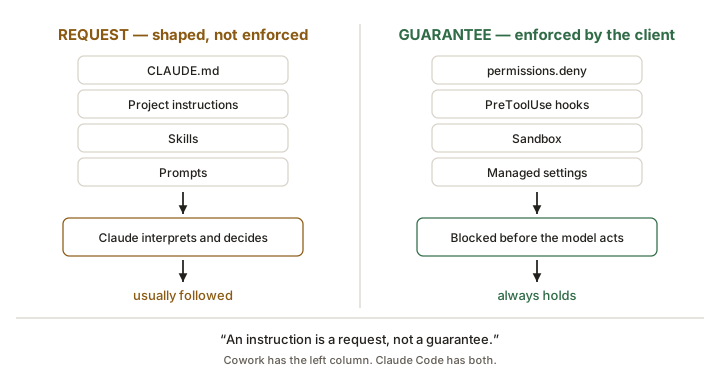
Hooks are Claude Code's enforcement primitive, and the documentation is unusually direct about why they matter:
Verbatim — Extend Claude Code"Put guardrails in hooks. An instruction like 'never edit
.env' in CLAUDE.md or a skill is a request, not a guarantee. APreToolUsehook that blocks the edit is enforcement. If a rule must hold every time, make it a hook rather than a prompt instruction."
In Cowork, hooks exist only as a component that an installed plugin can provide. There is no documented user-authored hook workflow. This is the sharpest governance gap between the two products and is worth its own slide for any risk or compliance stakeholder.
Choosing the right mechanism — Anthropic's own guidance
Claude Code's docs publish a "build your setup over time" table that transfers well to Cowork with light translation:
| Trigger | Claude Code answer | Cowork equivalent |
|---|---|---|
| Claude gets a convention wrong twice | Add it to CLAUDE.md | Add it to the project's Instructions |
| You keep typing the same prompt to start a task | Save it as a user-invocable skill | Save it as a skill in Customize |
| You paste the same playbook for the third time | Capture it as a skill | Capture it as a skill |
| You keep copying data from a system Claude can't see | Connect it as an MCP server | Add the connector |
| A side task floods the conversation with output | Route it through a subagent | Let Cowork's sub-agent coordination handle it, or use Dispatch |
| You want something to happen every time without asking | Write a hook | ◐ No native equivalent — requires a plugin |
| A second repo / team needs the same setup | Package it as a plugin | Package it as a plugin |
Context cost — a concept worth teaching in both products
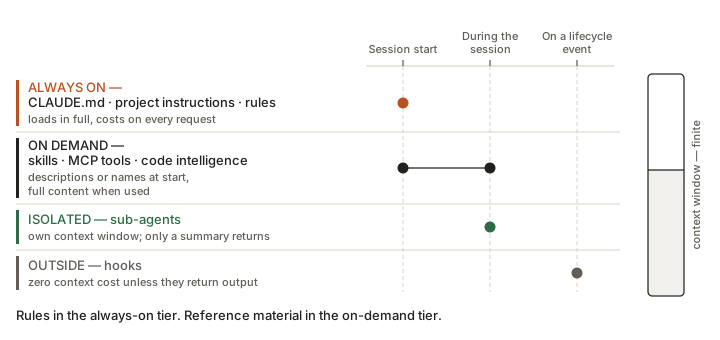
| Feature | When it loads | Context cost |
|---|---|---|
| CLAUDE.md / Project instructions | Session start | Every request |
| Skills | Descriptions at start; full content when used | Low |
| MCP servers | Tool names at start; schemas on demand | Low until a tool is used |
| Subagents | When spawned | Isolated from the main session |
| Hooks | On trigger | Zero, unless the hook returns output |
"Context is the agent's working memory, and it is finite. Standing instructions cost you on every request; skills cost you only when used. So put rules in instructions and reference material in skills." That single sentence explains 80% of good setup hygiene in either product.